WordPress plugin · Version 1.1.3

ABeCe Booking

Sports Facility Booking Built into WordPress

Manage facilities, bookings, prices and memberships in one place. Start for free and choose the edition that suits your venue.

ABeCe BookingLite 1.1.3 is available on WordPress.org. Starter, Club and Pro add customer online bookings.

ABeCe Booking administration calendar with staff-managed bookings and a resource block.
Administration calendar · Demo data · English interface

Experience in development and daily operations

Building Booking Systems Since 2011

A booking system needs to work for customers and for the people running the venue. Through development, hands-on operation and long-term work with venue operators, we deal with regular training sessions, memberships, schedule changes, pricing exceptions and outstanding payments.

ABeCe Booking is built around those lessons.

Bookings on Your Club’s Website

Record bookings, set opening hours, manage prices and check availability directly in WordPress. To let players book online themselves, choose Starter, Club or Pro.

Who Is ABeCe Booking For?

ABeCe Booking goes beyond tennis courts. It is designed for sports clubs and venues that need to book courts, lanes, tables or other facilities for specific time slots.

  • Tennis and padel clubs
  • Volleyball and football tennis facilities
  • Billiards and pool clubs
  • Bowling centres
  • Multi-sport venues and sports complexes

ABeCe Booking runs directly on your WordPress website, with booking data stored in your own WordPress database.

Staff-Managed or Customer Self-Service Bookings?

Lite · Free

Staff-managed bookings

Staff enter bookings received by phone or in person. The calendar, opening hours, prices and payment records are in one place. There is no limit on managed facilities or staff-created bookings.

Visitors can view occupancy. Lite does not let customers create their own bookings.

Starter, Club and Pro

Customer Self-Service Bookings

Customers sign in with a WordPress account, choose an available slot and book. The system checks availability, pricing and conflicts. Customers can manage their bookings and cancel under your venue’s rules.

For example, Starter can manage 12 facilities and offer four of them for online booking. Club and Pro have no online facility quota.

From booking to daily operations

Tools for Day-to-Day Venue Management

Customer Self-Service Bookings

From Starter

Starter lets customers book on up to four selected online-bookable facilities. Club and Pro have no such quota. All paid editions include customer booking management and online cancellation.

Calendar, facilities and opening hours

Every edition

Set individual opening hours, sport types and other settings for each facility. Use schedule exceptions for public holidays or special opening days, and block time slots for tournaments, club events or maintenance. Outdoor facilities can also follow sunrise and sunset times.

Pricing and payments

Lite basics · Price bands from Starter

Lite covers facility rates, payments and unpaid balances. Starter adds off-peak and peak pricing plus bank instructions with QR codes. Pro supports credit payments.

Memberships and participants

From Club

Club and Pro manage members, seasons and member pricing based on who is playing. Imports, bulk renewals and playing-time limits simplify club administration.

Recurring bookings and blocks

From Starter

Staff create a recurring series with conflict checks, then edit individual or following dates as needed. Several facilities can be blocked together for tournaments, club events or maintenance.

Stay in control

Every edition · Financial reporting in Pro only

Staff book for customers and handle cancellations and no-shows under club rules. Every edition includes change history, basic statistics and privacy tools; Pro adds financial reporting.

Manage your facilities in WordPress

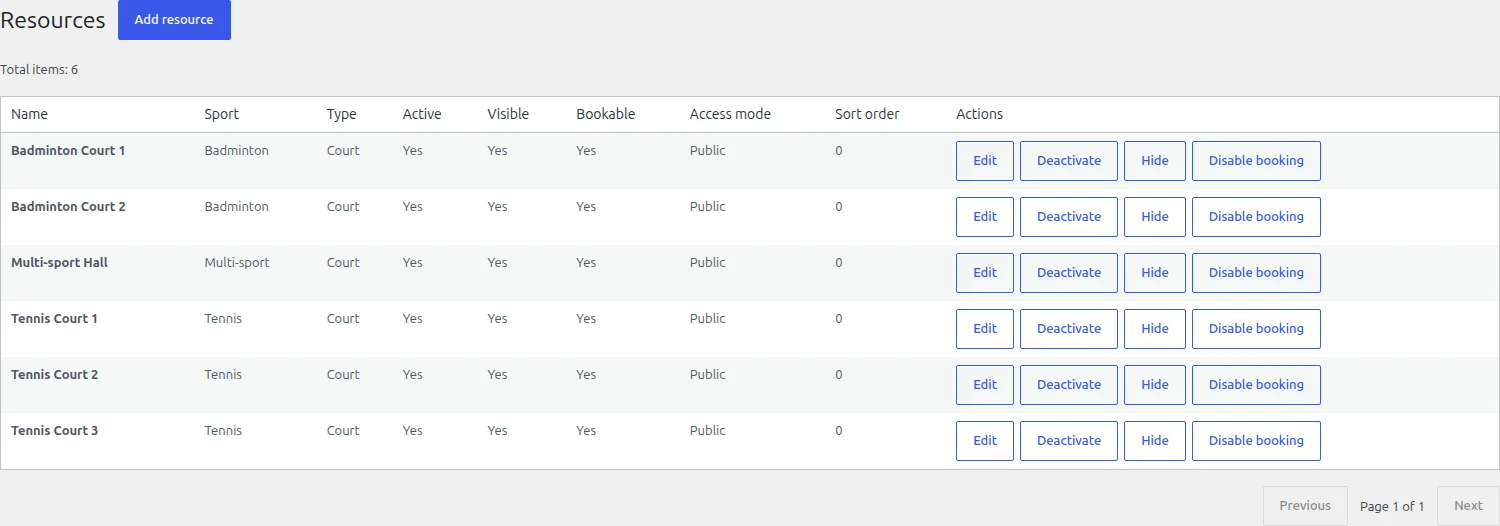
Manage facilities, visibility and availability in one place. Internal management is unlimited in every edition; in Premium, you separately select facilities for customer online bookings.

ABeCe Booking Lite resource administration: facility list, sports, availability and booking rules.
Resource administration · Lite · Demo data · English interface

Built around club operations

Booking Rules That Fit Your Club

Pricing for Different Times, Facilities and Players

From Starter, vary prices by time of day, facility or date range. In Club and Pro, you can give members a 100% discount on their share: two members play free, while one member playing with one guest pays half the standard booking price. This is an optional setup; your club decides the rules.

Keep receivables under control

Lite includes payment and receivable records. For staff-managed bookings, the operator can review debts and confirm an exception with a reason. From Starter, the system can reject a debtor’s further self-service bookings after a grace period.

Prepaid Credit for Bookings

A player has CZK 1,000 in credit and selects credit payment for a CZK 300 booking. Pro deducts the charge, leaving CZK 700. If the booking is cancelled, the system calculates any refund under the configured cancellation terms. All transactions remain recorded in the credit history.

Schedule Regular Training in One Step

For training every Tuesday at 5 pm, staff create one series. From Starter, the system checks for conflicts before creating the bookings. If a training session is cancelled or needs to be rescheduled, the manager can update that booking without changing the remaining sessions in the series.

Four editions, room to grow

Choose the Right Edition for Your Club

Lite is free with no time limit. Paid editions have an annual license for one production site. Every edition includes unlimited internally managed facilities.

Free Staff-Managed Bookings

Lite

Unlimited managed facilities

Free

No time limit

An occupancy calendar, unlimited staff-managed bookings, opening hours, blocks, basic rates and manual payment and receivable records. No time limit or paid licence required.

No customer self-service bookings.

WordPress.org

Download for free

For Customer Self-Service

Starter

Up to 4 online-bookable facilities

$89 USD

per year / 1 site

Alternatively €79 / year

Everything in Lite, plus customer self-service on up to four selected facilities. Recurring bookings, price bands, grouped blocks and bank/QR instructions.

Unlimited facilities for staff management.

Annual license · Freemius

Buy Starter

For Membership-Based Clubs

Club

Unlimited online facilities and memberships

$169 USD

per year / 1 site

Alternatively €149 / year

Everything in Starter with no online facility quota. Membership categories, seasons, member rates, imports and renewals, benefit limits and operational exports.

For the daily needs of a membership-based club.

Annual license · Freemius

Buy Club

Credit Accounts and Finance

Pro

Unlimited online-bookable facilities

$279 USD

per year / 1 site

Alternatively €249 / year

Everything in Club, plus player credit accounts: automatic deductions and refunds under cancellation terms, transaction history, detailed financial statistics and exports.

Credit accounts and financial records together.

Annual license · Freemius

Buy Pro

Club covers the daily needs of a membership-based club. Choose Pro when you also want prepaid player credit accounts and detailed financial records.

Purchase your license through the secure Freemius checkout. You will see the final amount and annual license terms before completing your order. You can select EUR or USD in the checkout.

Purchased features remain available after normal licence expiry; updates and support require a valid licence. Revocation or a refund is governed by the licence terms.

Compare features across editions

Staff-managed facilities and bookings are unlimited in every edition. Starter’s quota applies only to four facilities selected for customer self-service. Higher editions include the features of the editions below them.

On smaller screens, scroll the table horizontally.

Key differences between editions
FeaturesLiteStarterClubPro
Managed facilitiesUnlimitedUnlimitedUnlimitedUnlimited
Customer self-service bookingsNoYesYesYes
Online-bookable facilities04UnlimitedUnlimited
Recurring bookings and series editingNoYesYesYes
Membership categories and seasonsNoNoYesYes
Credit accountsNoNoNoYes
12 language variants included by defaultYesYesYesYes
Show all features
ABeCe Booking 1.1.3 features by edition
FeaturesLiteStarterClubPro
Bookings
Managed facilitiesUnlimitedUnlimitedUnlimitedUnlimited
Staff-managed bookingsYesYesYesYes
Read-only public occupancy calendarYesYesYesYes
Customer self-service bookingsNoYesYesYes
Online-bookable facilities04UnlimitedUnlimited
Customer management of own bookingsNoYesYesYes
Customer online cancellationNoYesYesYes
Participants and conflict checksYesYesYesYes
Operations and scheduling
Individual opening hoursYesYesYesYes
Sunrise and sunset opening hoursYesYesYesYes
Schedule exceptions and individual blocksYesYesYesYes
Recurring bookings and series editingNoYesYesYes
Grouped blocks and exceptionsNoYesYesYes
Cancellation and no-show rulesYesYesYesYes
Pricing
Basic facility ratesYesYesYesYes
Price bands by time, day and date rangeNoYesYesYes
Member pricing and participant mixNoNoYesYes
Memberships
Membership categories and seasonsNoNoYesYes
Link members to WordPress accountsNoNoYesYes
Membership imports and renewalsNoNoYesYes
Membership playing-time limitsNoNoYesYes
Manual customer restrictionsNoNoYesYes
Payments and receivables
On-site payments and manual payment recordsYesYesYesYes
Receivables and debt checks for staff bookingsYesYesYesYes
Blocking new debtor self-service bookingsNoYesYesYes
Bank payment instructionsNoYesYesYes
SPAYD / EPC QR payment instructionsNoYesYesYes
Finance and statistics
Credit accountsNoNoNoYes
Automatic credit deductions and refunds under your rulesNoNoNoYes
Credit transaction ledgerNoNoNoYes
Advanced financial reportingNoNoNoYes
Financial exportsNoNoNoYes
Basic operational statisticsYesYesYesYes
Member statistics and advanced operational reportsNoNoYesYes
Operational CSV/XLSX exportsNoNoYesYes
Administration
Email notificationsYesYesYesYes
Change history and staff permissionsYesYesYesYes
12 language variants included by defaultYesYesYesYes
Privacy
Personal-data export and erasure toolsYesYesYesYes
Data minimisation and retention toolsYesYesYesYes
Personal-data requestsYesYesYesYes
Updates and support
Use with no time limitFree LiteAfter normal expiry¹After normal expiry¹After normal expiry¹
Update distributionWordPress.orgWith a valid licenceWith a valid licenceWith a valid licence
Licence support entitlementNo paid supportWith a valid licenceWith a valid licenceWith a valid licence

¹ Purchased features remain active after normal license expiry without revocation; updates and support require a valid license.

Bank transfer and QR payments provide payment instructions; they are not a card payment gateway or automatic bank reconciliation.

Privacy tools in every edition

Control over customer records

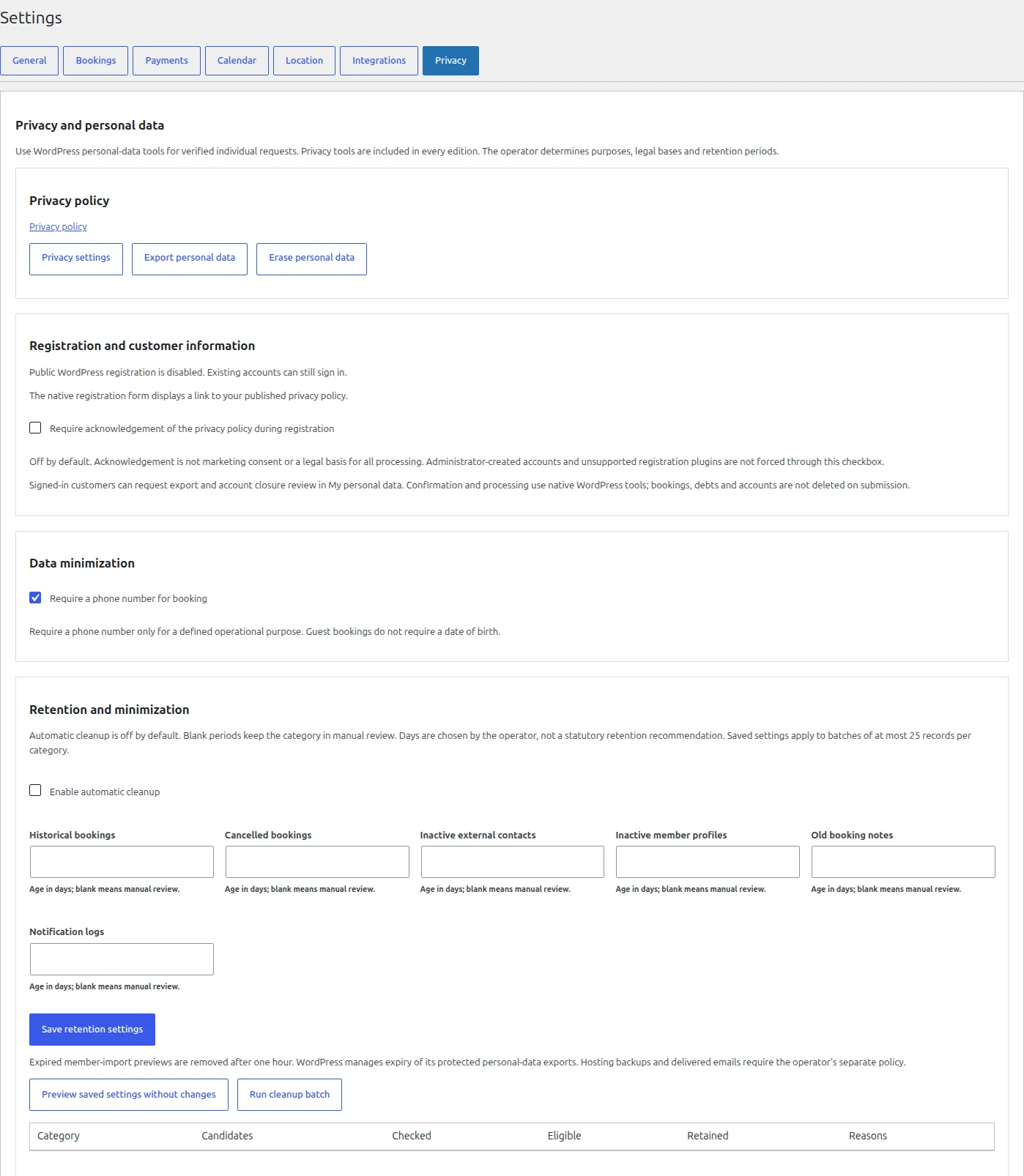
Records stay in your WordPress database. Every edition includes export, erasure and retention tools. The operator is responsible for the purpose and legal basis of processing; an erasure request does not itself delete bookings or outstanding obligations.

View the privacy settings
ABeCe Booking Lite privacy settings: export, erasure, data minimization and retention preview.
Privacy tools · All editions · English interface

From choosing an edition to your first booking

Getting started

Start free with Lite

  1. In WordPress, open Plugins → Add New and search for ABeCe Booking. You can also find the plugin on WordPress.org.
  2. Install and activate Lite. Add your facilities, opening hours and basic prices.
  3. For a public calendar, add the [abece_booking] shortcode to a page and select that page in the plugin settings. Staff can start creating bookings.
Download for free

Enable online bookings with Premium

  1. Choose Starter, Club or Pro and purchase your license through Freemius.
  2. Get your license and Premium ZIP from the purchase confirmation or your Freemius customer account.
  3. In WordPress, open Plugins → Add New → Upload Plugin. Upload the Premium ZIP, activate Premium and enter your license key. Then select facilities for online bookings and publish a page with the [abece_booking] shortcode.
Compare editions

When switching from current Lite, back up the site and database first. Upload Premium, deactivate Lite and activate Premium; do not run both editions at once. The supported procedure retains operational data. Historical test versions may require individual migration.

Practical answers

Frequently asked questions

Do I need WordPress to use ABeCe Booking?

Yes. Install the plugin on your own hosted WordPress website. Booking management and the public calendar run as part of that website.

What is included in free Lite?

Lite is free with no time limit, paid license or mandatory Freemius account. Staff can create unlimited bookings across unlimited facilities, for example by phone. It includes a calendar, opening hours, blocks, basic pricing, payments and receivables, basic statistics, emails and privacy tools. The public can view availability; customers cannot book online themselves in Lite.

How do the editions differ and how many facilities can I manage?

Every edition lets you manage unlimited facilities internally. Starter adds customer online bookings for up to four selected facilities, recurring bookings, price bands and bank/QR instructions. You can manage twelve facilities and offer four online. Club and Pro have no online facility limit; Club adds memberships and member pricing, while Pro also adds credits and financial reports.

Can customers make their own bookings?

Yes, in Starter, Club and Pro, after signing in with a WordPress account. Customers choose from the facilities enabled for online booking by the operator. In Lite they can view occupancy and contact staff to book.

What happens if I disable online booking for a facility?

The facility remains in administration and existing bookings are retained. New customer bookings for that facility stop. In an edition with self-service, customers can still view and cancel their existing bookings under your rules.

Can I change edition without losing my data?

The supported move from current Lite to Premium or between plans retains bookings and other operational data. Back up your site and database and follow the installation instructions; historical test versions may require individual migration. Paid features depend on the license. Moving from Club to Starter with more than four online facilities pauses new online bookings until an administrator reduces the selection. Internal management continues.

How does the annual license and renewal work?

The listed paid edition price covers one year for one production site. Subscription and renewal terms are shown in the Freemius checkout before purchase. Purchased features remain active after normal expiry; updates and support require a valid license. License revocation or a refund can change paid access. A license change does not itself delete operational data.

Can I set different prices for different times and facilities?

Every edition lets you set a basic price for each facility. Starter adds price bands by time of day, day or period. Club and Pro let you manage memberships and account for member pricing and mixed groups of members and non-members.

How do payments, credits and receivables work?

Every edition includes manual payment and receivable records. From Starter, provide bank/QR instructions and reject new self-service bookings under your debtor rules. Pro adds credit accounts with deductions and refunds. Bank/QR instructions are not a card gateway or automatic bank reconciliation; staff confirm receipt.

How are cancellations handled?

Staff can cancel bookings under your configured terms in every edition. From Starter, customers can cancel their own bookings online and see the calculated fee before confirming. In Pro, eligible credit refunds return to the credit account; staff make and record bank refunds.

Does the system support multiple languages?

Yes. All editions, including Lite, ship with 12 language variants. The public interface follows the site or current page language determined by WordPress; administration follows the user’s profile language. Your own website content is not translated automatically.

Where is data stored and who is responsible for privacy?

Records are stored in your WordPress database on your hosting. Every edition has personal-data export, erasure and retention tools. The operator is responsible for backups, access, legal bases and privacy policies. The plugin alone does not ensure GDPR compliance.

How will I receive plugin updates?

Lite receives standard updates from WordPress.org. Premium receives updates through Freemius in the WordPress administration with a valid license. Back up the site and database before updating. For historical test versions, arrange a supported upgrade procedure first.

Start with free internal management

We’ll Help You Choose the Right Edition

Tell us how many facilities you run, how you manage memberships and whether you need credits. We will recommend an edition that suits your venue.

Contact ABeCe

info@abece.cz